
6. GitLab CI/CD Pipeline Example#
This adaptive cruise control example shows use of Reactis (for Simulink) in a GitLab CI/CD pipeline, implementing some of the ideas from the previous sections. This pipeline is suitable for use as the default (branch) pipeline that runs on each commit.
6.1. Project Layout and Test Strategy#
The example has the project file hierarchy containing models and test artifacts
as shown in Table 6.1. The file adaptive_cruise.prj defines
a MATLAB project to organize the project files, initialize the MATLAB workspace
for the project, define the MATLAB path for the project, etc.
Section 6.3 below describes how to adapt the pipeline
definition if you are not using MATLAB projects.
Files |
Description |
||||
|---|---|---|---|---|---|
.gitlab-ci.yml |
GitLab pipeline configuration |
||||
adaptive_cruise.prj |
MATLAB project file |
||||
resources/ |
Project data |
||||
model/ |
Model folder |
||||
controller/ |
|||||
adaptive_cruise_controller.slx |
Controller model, e.g. for code generation |
||||
adaptive_cruise_controller.rsi |
Reactis info file |
||||
… |
|||||
system/ |
|||||
adaptive_cruise.slx |
System model, e.g. with plant |
||||
adaptive_cruise.rsi |
Reactis info file |
||||
… |
|||||
lib/… |
Library blocks |
||||
test/ |
Test folder |
||||
coverage/… |
|||||
regression/ |
Regression test folder |
||||
model1/ |
|||||
harness1/ |
|||||
test1.rst |
|||||
… |
|||||
… |
|||||
… |
|||||
reactis/ |
MATLAB scripts that implement pipeline jobs |
||||
… |
|||||
In the integrated design and test process described in Section 2, Reactis is used to validate and test models
via CI/CD during design. To achieve this, the design stage of the development
process introduces a Reactis info (.rsi) file alongside each model (.slx)
file. An .rsi file defines the parts of the model to validate and test using
harnesses[1] and Validator objectives (assertions and user-defined
targets). When the example pipeline is run on a commit, the job
reactis-short-test in the pipeline definition in Listing 6.1 runs Reactis Tester on every harness of every model that
has a corresponding Reactis info (.rsi) file. These Tester runs can flag
runtime errors and assertion violations as well as report the level of coverage
attained by the tests. With the Reactis harnesses in place, the test
activities can run concurrently; for example, nightly Tester runs could be
scheduled and alloted more time to run in order to generate test suites with
higher coverage and increased probability of uncovering errors. Although not
shown in this example, this run of Reactis Tester could preload test suites
produced by test activities to further improve coverage.
Another output of the test activities may be a set of regression test suites to
check that a model has desired behavior in particular scenarios. In the
integrated design and test process, Reactis is also used to re-run these
regression test suites via CI/CD during design. To achieve this, regression test
suites for a harness h in a model m are added to the folder
test/regression/m/h. Then, when this example pipeline
is run on a commit, the job reactis-regression-test in the pipeline definition
in Listing 6.1 runs Reactis Simulator on every
regression test suite of every harness of every model that has a corresponding
Reactis info (.rsi) file, checking that the model outputs match the expected
outputs from the test suite.
6.2. GitLab Pipeline Definition#
The pipeline definition in Listing 6.1 implements
the guidance from Section 4.2 to avoid
the jobs reactis-short-test and reactis-regression-test both performing
model translation and static analysis steps. This is achieved by introducing
additional pipeline stages (build and analyze) to ensure these steps are
performed only once, using the jobs reactis-build and reactis-analyze. These
jobs use artifacts to propagate the Reactis cache (.mwi and .mwib) files to
later jobs, preventing later use of Reactis repeating these steps.
 1stages:
 2  - build
 3  - analyze
 4  - test
 5
 6reactis-build:
 7  stage: build
 8  tags:
 9    - matlab
10    - reactis
11  script:
12    - matlab -batch "proj = openProject(\"$CI_PROJECT_DIR\"); reactisBuild(findReactisModelsInProject(proj)); close(proj);"
13  artifacts:
14    paths:
15      - "**/*.mwi"
16
17reactis-analyze:
18  stage: analyze
19  tags:
20    - matlab
21    - reactis
22  script:
23    - matlab -batch "proj = openProject(\"$CI_PROJECT_DIR\"); reactisAnalyze(findReactisModelsInProject(proj)); close(proj);"
24  artifacts:
25    paths:
26      - "**/*.mwib"
27
28reactis-short-test:
29  stage: test
30  tags:
31    - matlab
32    - reactis
33  script:
34    - matlab -batch "proj = openProject(\"$CI_PROJECT_DIR\"); reactisShortTest(findReactisModelsInProject(proj)); close(proj);"
35  artifacts:
36    when: always
37    paths:
38      - "**/*.rst"
39      - "**/*.html"
40
41reactis-regression-test:
42  stage: test
43  tags:
44    - matlab
45    - reactis
46  script:
47    - matlab -batch "proj = openProject(\"$CI_PROJECT_DIR\"); reactisRegressionTest(proj.RootFolder, findReactisModelsInProject(proj)); close(proj);"
48  artifacts:
49    when: always
50    paths:
51      - "**/*.html"
Each job in the pipeline definition in Listing 6.1 invokes MATLAB in batch mode and calls a MATLAB function to perform the specific operation. The MATLAB functions are defined in Section 6.5 below.
This example demonstrates basic integration with MATLAB projects. More advanced use of MATLAB features is possible but this is not done to avoid adding further complexity to the MATLAB code that is not related to Reactis. For example, the MATLAB project API can be used to determine the impacted files, so that the CI/CD pipeline does not re-run Reactis where nothing has changed. Furthermore, integration with other features such as MATLAB unit test may be possible.
6.3. Adapting the Pipeline Definition if not Using MATLAB Projects#
The pipeline example above assumes a MATLAB project is used.
Although MATLAB projects provide benefits for CI, this example can be
easily adapted for use without a MATLAB project. The same scripts
would be used except findReactisModelsInProject would be replaced by
an alternative function findReactisModelsInDir that finds Reactis
models in a directory. Previously, opening the MATLAB project
initialized the MATLAB path, enabling MATLAB to find the CI scripts.
This would now need to be done explicitly. For example, the script
for the pipeline job reactis-short-test could instead be:
  script:
    - matlab -batch "addpath(fullfile(\"$CI_PROJECT_DIR\", \"reactis\")); reactisShortTest(findReactisModelsInDir(\"$CI_PROJECT_DIR\"));"
An example implementation for findReactisModelsInDir is shown
in Listing 6.7 below.
6.4. GitLab Interface#
On pushing changes to a GitLab repository, a new instance of this default
pipeline is created. The GitLab interface displays an overview of the pipeline
and the status of each job, as shown in Figure 6.1.
The green check marks indicate that the reactis-build and reactis-analyze
jobs completed successfully. The pie chart indicates that reactis-short-test
is currently running and the pause symbol indicates that
reactis-regression-test is waiting to be run.
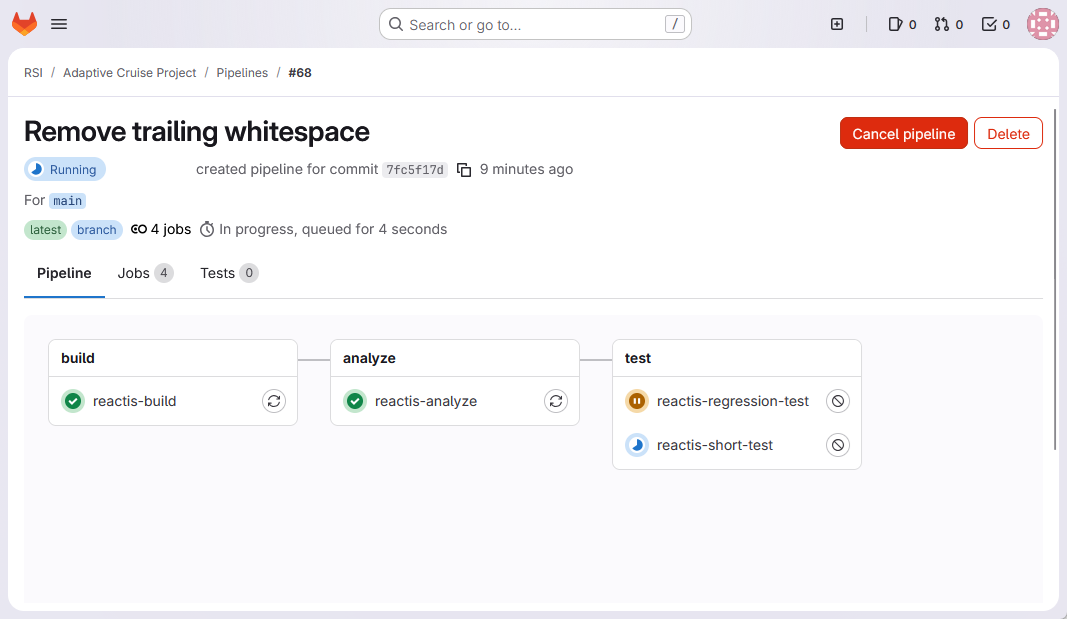
Fig. 6.1 GitLab pipeline overview, showing the stages and the status of the jobs in each stage.#
In the event that a Reactis CI check fails, the job and the pipeline fail,
as shown in Figure 6.2.
The red x indicates that the reactis-short-test job failed.
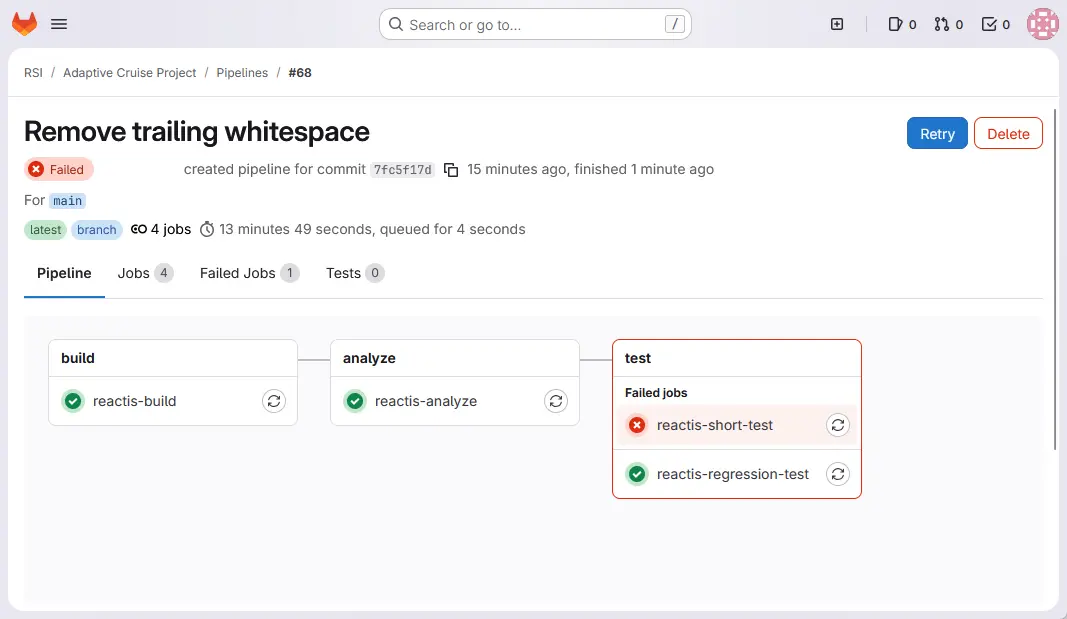
Fig. 6.2 GitLab pipeline overview, showing the failed job and pipeline#
For a test failure, details relating to the failure are provided in the generated Reactis test execution report (.html). The report and test suite can be downloaded via the job artifacts, as circled in red in Figure 6.3.
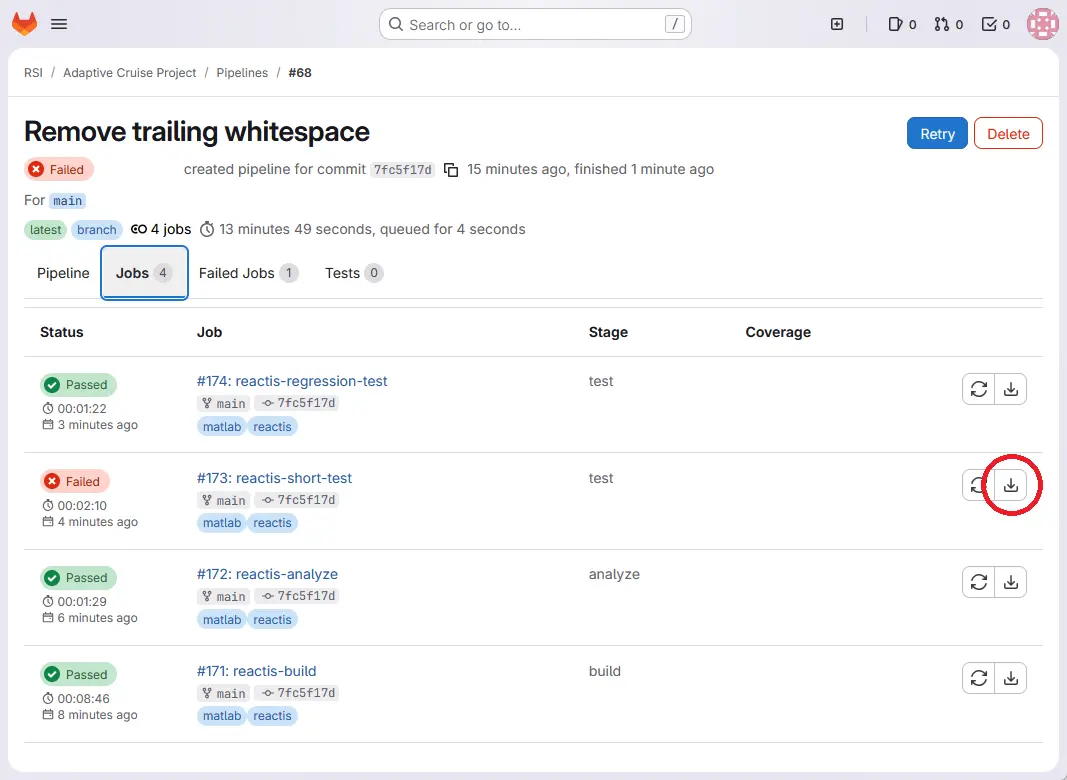
Fig. 6.3 GitLab pipeline jobs, showing the status of each job#
Snippets of the generated test execution report are shown in
Figure 6.4.
The report shows there were assertion failures in tests 4 and 8.
The assertion Low_speed_inactive failed in step 3 of test 4.
Since the test suite triggering the error was also included in the
artifacts, the suite can be loaded into Reactis Simulator and test
4 can be run to step 3 in order to diagnose the issue.
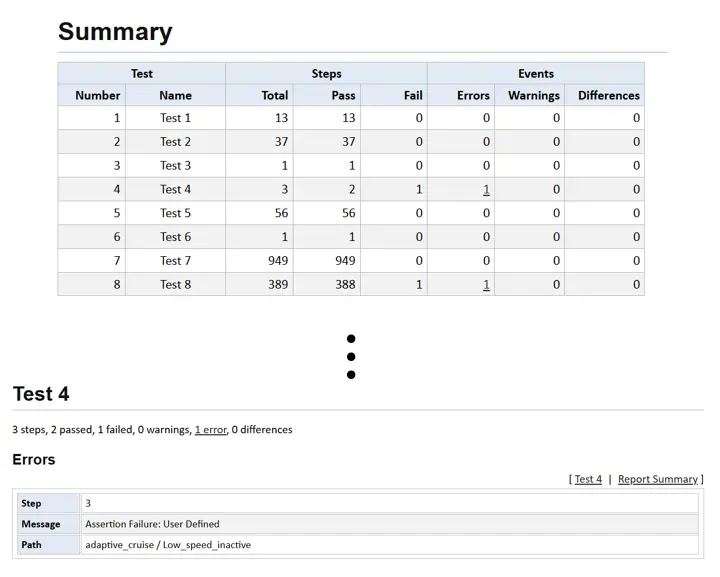
Fig. 6.4 Test execution report showing there were assertion failures.#
Information printed by the MATLAB scripts can be seen in the job output console, as shown in Figure 6.5. This shows which harness in which model the failure occurred in.
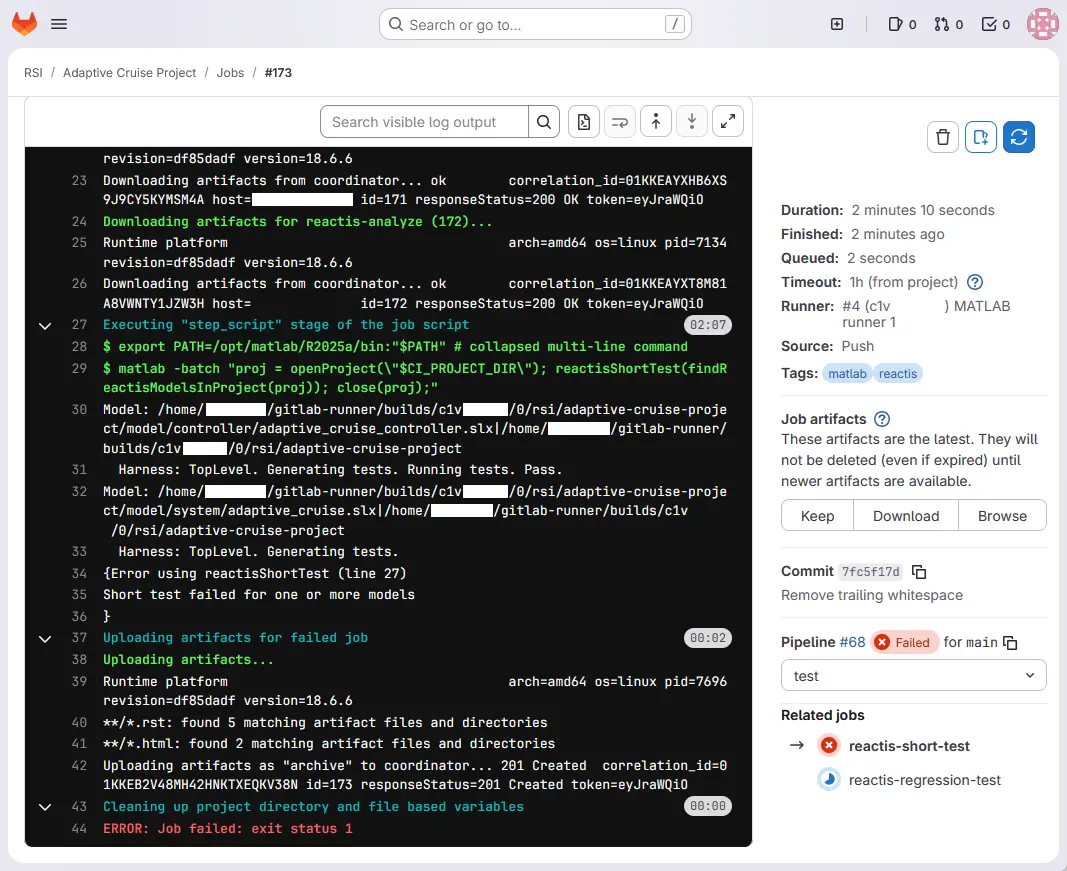
Fig. 6.5 GitLab job output#
6.5. GitLab Job Definitions#
 1function reactisBuild(models)
 2% reactisBuild  Translate models with Reactis
 3%
 4% For every model m in models, translate the model for each harness in the
 5% model's Reactis info file, caching the result in a .mwi file.
 6
 7    rsOpen;
 8
 9    % Ensure the separate MATLAB instance use for translation remains open
10    % so that it can be reused, to avoid starting a fresh MATLAB instance
11    % for every model.
12    oldMatlabEngineType = rsGetParameterValue('MatlabEngineType');
13    oldIdleTimeout = rsGetParameterValue('MatlabIdleTimeout');
14    rsSetParameterValue('MatlabEngineType', 'socket');
15    rsSetParameterValue('MatlabIdleTimeout', '20.0');
16
17    ok = true;
18    for i = 1:numel(models)
19        m = models(i);
20        fprintf('Model file: %s\n', m.modelFileName);
21
22        rsiId = rsRsiOpen(m.rsiFileName, m.modelFileName);
23        harnessNames = rsRsiGetHarnesses(rsiId);
24        for j = 1:numel(harnessNames)
25            harnessName = harnessNames{j};
26            fprintf('  Harness: %s\n', harnessName);
27            rsiChanged = false;
28
29            % Check the current harness and change it if required.
30            if ~isequal(rsRsiGetCurrentHarness(rsiId), harnessName)
31                rsRsiSetCurrentHarness(rsiId, harnessName);
32                rsiChanged = true;
33            end
34
35            % Ensure translation is cached in .mwi files.
36            if ~isequal(rsRsiGetParameterValue(rsiId, 'DoMWICaching'), '1')
37                rsRsiSetParameterValue(rsiId, 'DoMWICaching', '1');
38                rsiChanged = true;
39            end
40
41            % Save .rsi file if changed.
42            if rsiChanged
43                rsRsiSave(rsiId);
44            end
45
46            % To translate from Simulink without subsequently
47            % performing reachability analysis we would ideally
48            % use `rsSimOpen` but this has no argument to inhibit
49            % reachability analysis in V2025.2 and earlier.
50            % Therefore we use rsTester with `-P solverLanguage=none`
51            % and specify the minimum number of test steps.  We
52            % cannot specify no steps and the single test step
53            % could cause a run-time error.  This error is still
54            % useful information.
55            try
56                suiteId = rsTester(m.modelFileName, m.rsiFileName, [], '-P solverLanguage=none -r 1;1 -t 0');
57                rsSuiteClose(suiteId);
58            catch e
59                ok = false;
60                fprintf(getReport(e));
61            end
62        end
63        rsRsiClose(rsiId);
64    end
65
66    rsSetParameterValue('MatlabEngineType', oldMatlabEngineType);
67    rsSetParameterValue('MatlabIdleTimeout', oldIdleTimeout);
68
69    rsClose;
70
71    if ~ok
72        error("Translation failed for one or more models");
73    end
74
75end
 1function reactisAnalyze(models)
 2% reactisAnalyze  Statically analyze translated models with Reactis
 3%
 4% For every model m in models, analyze the translated model for each harness
 5% in the model's Reactis info file, using a Reactis cache (.mwi) file if one
 6% exists, caching the result in a .mwib file.
 7
 8    rsOpen;
 9
10    ok = true;
11    for i = 1:numel(models)
12        m = models(i);
13        fprintf('Model file: %s\n', m.modelFileName);
14
15        rsiId = rsRsiOpen(m.rsiFileName, m.modelFileName);
16        harnessNames = rsRsiGetHarnesses(rsiId);
17        for j = 1:numel(harnessNames)
18            harnessName = harnessNames{j};
19            fprintf('  Harness: %s\n', harnessName);
20            rsiChanged = false;
21
22            % check the current harness and change it if required
23            if ~isequal(rsRsiGetCurrentHarness(rsiId), harnessName)
24                rsRsiSetCurrentHarness(rsiId, harnessName);
25                rsiChanged = true;
26            end
27
28            % Ensure cached files from translation stage are used.
29            if ~isequal(rsRsiGetParameterValue(rsiId, 'DoMWICaching'), '1')
30                rsRsiSetParameterValue(rsiId, 'DoMWICaching', '1');
31                rsiChanged = true;
32            end
33
34            % Ensure reachability analysis is cached in .mwib files.
35            if ~isequal(rsRsiGetParameterValue(rsiId, 'DoMWIBinaryCaching'), '1')
36                rsRsiSetParameterValue(rsiId, 'DoMWIBinaryCaching', '1');
37                rsiChanged = true;
38            end
39
40            % Save .rsi file if changed.
41            if rsiChanged
42                rsRsiSave(rsiId);
43            end
44
45            % To perform reachability analysis we could use
46            % `rsSimOpen` and then `rsSimClose` without taking
47            % any simulation steps.  However, this does not
48            % cache information required for Tester in .mwib
49            % files, so a subsequent run of Tester would redo
50            % reachability analysis.  Therefore, as in
51            % `reactisBuild`, we use `rsTester` and specify the
52            % minimum number of test steps.  We cannot specify
53            % no steps and the single test step could cause a
54            % run-time error.  This error is still useful
55            % information.
56            try
57                suiteId = rsTester(m.modelFileName, m.rsiFileName, [], '-r 1;1 -t 0');
58                rsSuiteClose(suiteId);
59            catch e
60                ok = false;
61                fprintf(getReport(e));
62            end
63        end
64        rsRsiClose(rsiId);
65    end
66
67    rsClose;
68
69    if ~ok
70        error("Analysis failed for one or more models");
71    end
72
73end
 1function reactisShortTest(models)
 2% reactisShortTest  Test models with Reactis Tester
 3%
 4% For every model m in models, run Tester with default parameters on each
 5% harness in the model's Reactis info file, using Reactis cache (.mwi and .mwib)
 6% files if they exist.
 7
 8    rsOpen;
 9
10    ok = true;
11
12    rsSetWarningMode(0);
13
14    for i = 1:numel(models)
15        m = models(i);
16        if ~(isfolder(m.path))
17            fprintf('Model directory %s does not exist\n', m.path);
18            ok = false;
19        else
20            ok = runShortTestOnModel(m) && ok;
21        end
22    end
23
24    rsClose;
25
26    if ~ok
27        error("Short test failed for one or more models");
28    else
29        fprintf("All short tests passed.\n");
30    end
31
32end
33
34function shortTestPass = runShortTestOnModel(m)
35    shortTestPass = true;
36    fprintf('\nModel: %s\n', m.modelFileName);
37    rsiId = rsRsiOpen(m.rsiFileName, m.modelFileName);
38    cd(m.path);
39    harnessNames = rsRsiGetHarnesses(rsiId);
40    for j = 1:numel(harnessNames)
41        harnessName = harnessNames{j};
42        fprintf('  Harness: %s. ', harnessName);
43
44        % Check the current harness and change it if required.
45        if ~isequal(rsRsiGetCurrentHarness(rsiId), harnessName)
46            try
47                rsRsiSetCurrentHarness(rsiId, harnessName);
48            catch e
49                fprintf('    Error: harness %s does not exist in %s.\n', harnessName, m.rsiFileName);
50                shortTestPass = false;
51            end
52            rsRsiSave(rsiId);
53        end
54
55        suiteFileName = fullfile(m.path, [m.base, '-', harnessName, '.rst']);
56
57        try
58            fprintf('Generating tests. ');
59            suiteId = rsTester(m.modelFileName, m.rsiFileName, suiteFileName);
60            try
61                reportFileName = [m.base, '-', harnessName, '.html'];
62                fprintf('Running tests. ');
63                simId = rsSimOpen(m.modelFileName, m.rsiFileName);
64                rsSimRunSuite(simId, suiteId, reportFileName);  % run the test suite!
65                rsSimClose(simId);
66                rsSuiteClose(suiteId);
67                reportText = fileread(reportFileName);
68                if contains(reportText, 'failed')
69                    shortTestPass = false;
70                    fprintf("Fail. See report %s for details.\n",reportFileName);
71                else
72                    fprintf("Pass.\n");
73                end
74            catch e2
75                shortTestPass = false;
76                fprintf(getReport(e2));
77            end
78        catch e1
79            shortTestPass = false;
80            fprintf(['Test generation failed:', getReport(e1), '\n']);
81        end
82    end
83    rsRsiClose(rsiId);
84end
  1function reactisRegressionTest(rootDir, models)
  2% reactisRegressionTest  Run regression tests with Reactis Simulator
  3%
  4% For every directory m and h and test suite ts in the path
  5%
  6%     `rootDir`/test/regression/m/h/ts
  7%
  8% where models contains a model m with a corresponding Reactis info file
  9% that has a harness h, start Reactis Simulator on the model m, select the
 10% harness h and run the test suite ts.
 11
 12    rsOpen;
 13
 14    regressionDir = [convertStringsToChars(rootDir), filesep, 'test', filesep, 'regression'];
 15
 16    ok = true;
 17
 18    regressionModelDirs = dir(regressionDir);
 19    for i = 1:numel(regressionModelDirs)
 20        file = regressionModelDirs(i);
 21        if file.isdir && ~matches(file.name, [".", ".."])
 22            modelName = file.name;
 23            regressionModelDir = [file.folder, filesep, modelName];
 24            fprintf('Model name: %s\n', modelName);
 25            % Find index of modelName in models.
 26            numModels = numel(models);
 27            i = 1;
 28            while i <= numModels && ~isequal(models(i).base, modelName)
 29                i = i + 1;
 30            end
 31            if i <= numModels
 32                m = models(i);
 33                ok = runRegressionTestsForModel(regressionModelDir, m) && ok;
 34            else
 35                fprintf('  No model file found, skipping\n');
 36            end
 37        end
 38    end
 39
 40    rsClose;
 41
 42    if ~ok
 43         error("Regression tests failed for one or more models");
 44    else
 45         fprintf("All regression test suites passed without warnings.\n");
 46    end
 47
 48end
 49
 50function regressionPass = runRegressionTestsForModel(regressionModelDir, m)
 51    regressionPass = true;
 52    fprintf('Model: %s\n', m.modelFileName);
 53    rsiId = rsRsiOpen(m.rsiFileName, m.modelFileName);
 54    regressionHarnessDirs = dir(regressionModelDir);
 55    for j = 1:numel(regressionHarnessDirs)
 56        hdir = regressionHarnessDirs(j);
 57        if hdir.isdir && ~matches(hdir.name, [".", ".."])
 58            regressionHarnessDirFull = [hdir.folder, filesep, hdir.name];
 59            fprintf('  Harness dir: %s\n', regressionHarnessDirFull);
 60
 61            % Check the current harness and change it if required
 62            if ~isequal(rsRsiGetCurrentHarness(rsiId), hdir.name)
 63                try
 64                  rsRsiSetCurrentHarness(rsiId, hdir.name);
 65                catch e
 66                  regressionPass = false;
 67                  fprintf('    Error: harness %s does not exist in %s.\n', hdir.name, m.rsiFileName);
 68                end
 69                rsRsiSave(rsiId);
 70            end
 71
 72            simId = rsSimOpen(m.modelFileName, m.rsiFileName);
 73
 74            regressionSuiteFiles = dir(regressionHarnessDirFull);
 75            for k = 1:numel(regressionSuiteFiles)
 76                file = regressionSuiteFiles(k);
 77                if ~file.isdir && endsWith(file.name, ".rst")
 78                    suiteName = file.name;
 79                    [~, sBaseName, ~] = fileparts(suiteName);
 80                    suiteFileName = [file.folder, filesep, suiteName];
 81                    fprintf('    Running test suite: %s. ', suiteName);
 82
 83                    try
 84                        suiteId = rsSuiteOpen(suiteFileName);
 85                        reportFileName = [m.base, '_', hdir.name, '_', sBaseName, '.html'];
 86                        rsSimRunSuite(simId, suiteId, reportFileName);  % run the test suite!
 87                        reportText = fileread(reportFileName);
 88                        if contains(reportText, 'failed')
 89                           regressionPass = false;
 90                           fprintf("Fail. See report %s for details.\n",reportFileName);
 91                        else
 92                           fprintf("Pass.\n");
 93                        end
 94                        rsSuiteClose(suiteId);
 95                    catch e
 96                        regressionPass = false;
 97                        fprintf(getReport(e));
 98                    end
 99                end
100            end
101            rsSimClose(simId);
102        end
103    end
104
105    rsRsiClose(rsiId);
106end
 1function models = findReactisModelsInProject(proj)
 2% findReactisModelsInProject  Find models used with Reactis in a project
 3%
 4%   models = findReactisModelsInProject(proj) returns the models in the
 5%   project proj that have an associated Reactis info (.rsi) file.  The
 6%   result is a 1xN structure array with fields
 7%     - modelFileName
 8%     - rsiFileName
 9%     - path
10%     - base
11
12    projectFiles = proj.Files;
13    projectDir = convertStringsToChars(proj.RootFolder);
14
15    % Preallocate models to maximum possible size.
16    def = struct("modelFileName", '', "rsiFileName", '', "path", '', "base", '');
17    models = repmat(def, size(projectFiles));
18
19    j = 0;
20    for i = 1:numel(projectFiles)
21        modelFileName = convertStringsToChars(projectFiles(i).Path);
22        [path, base, ext] = fileparts(modelFileName);
23        if isequal(ext, '.slx')
24            rsiFileName = fullfile(path, [base, '.rsi']);
25            if isfile(rsiFileName)
26                j = j + 1;
27                models(j).modelFileName = rsProjectModel(projectDir, modelFileName);
28                models(j).rsiFileName = rsiFileName;
29                models(j).path = path;
30                models(j).base = base;
31            end
32        end
33    end
34    models = models(1:j);
35
36end
The script in Listing 6.7 is not used in this example but may be useful if not using MATLAB projects.
 1function models = findReactisModelsInDir(rootDir)
 2% findReactisModelsInDir  Find models used with Reactis in a directory
 3%
 4%   models = findReactisModelsInDir(directory) recursively searches the
 5%   specified directory for models and returns models that have an
 6%   associated Reactis info (.rsi) file.  The result is a 1xN structure
 7%   array with fields
 8%     - modelFileName
 9%     - rsiFileName
10%     - path
11%     - base
12
13    % Recursive search of all files and folders
14    files = dir(fullfile(rootDir, '**\*.*'));
15
16    % Extract only the full names of the files into a cell array
17    fullFileNames = fullfile({files.folder}, {files.name})';
18
19    % Preallocate models to maximum possible size.
20    def = struct("modelFileName", '', "rsiFileName", '', "path", '', "base", '');
21    models = repmat(def, size(fullFileNames));
22
23    j = 0;
24    for i = 1:numel(fullFileNames)
25        modelFileName = convertStringsToChars(fullFileNames{i});
26        [path, base, ext] = fileparts(modelFileName);
27        if isequal(ext, '.slx')
28            rsiFileName = fullfile(path, [base, '.rsi']);
29            if isfile(rsiFileName)
30                j = j + 1;
31                models(j).modelFileName = modelFileName;
32                models(j).rsiFileName = rsiFileName;
33                models(j).path = path;
34                models(j).base = base;
35            end
36        end
37    end
38    models = models(1:j);
39
40end