Reactis® for Simulink® V2025.2 adds support for MATLAB® Projects and R2025b, tracks coverage inside Stateflow® state action code, and introduces a comments feature. Reactis for C V2025 simplifies AUTOSAR® testing workflows.
Highlights
- MATLAB Projects support: Reactis can now load MATLAB projects, reading search paths and workspace initialization automatically.
- Coverage in state action code: Statement, decision, condition, MC/DC, and MCC coverage are now tracked within Stateflow state actions for charts using the MATLAB action language (requires Reactis for EML Plugin).
- Model Comments: Add and manage comments inside models; comments are
stored in the Reactis info file (
.rsi) and tracked with author and timestamps. - AUTOSAR import wizard (Reactis for C): Import ARXML to generate a minimal RTE, build file, and harness for back-to-back testing of AUTOSAR runnables against model.
- Usability improvements: Harness selector now available in main toolbars, CSV test templates, detachable panels, and an option to omit empty coverage metrics in reports.
Reactis for Simulink V2025.2
Support MATLAB Projects
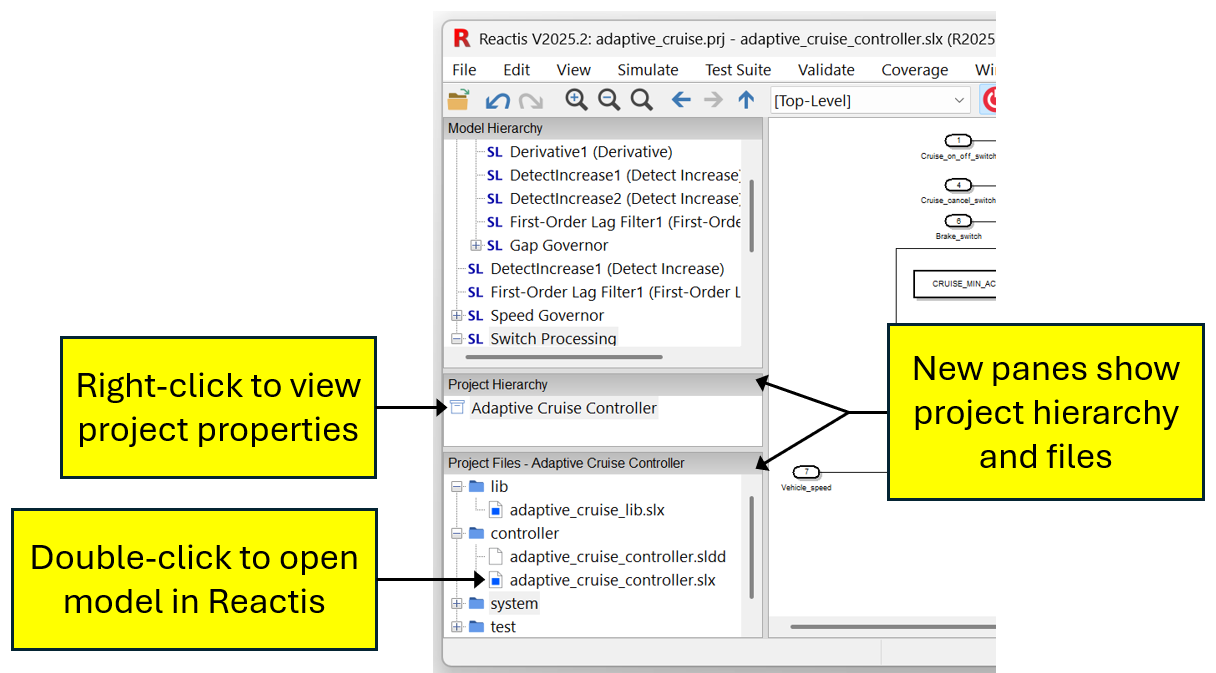
Reactis now loads MATLAB projects (formerly named Simulink projects) in order to simplify the process of setting up a model from a project for use in Reactis. Among other facilities for organizing the files of a project, MATLAB projects include settings for the model search path and workspace initialization. Reactis now reads these definitions from a MATLAB project, eliminating the need to repeat the setup steps within Reactis.
Track Coverage in State Action Code
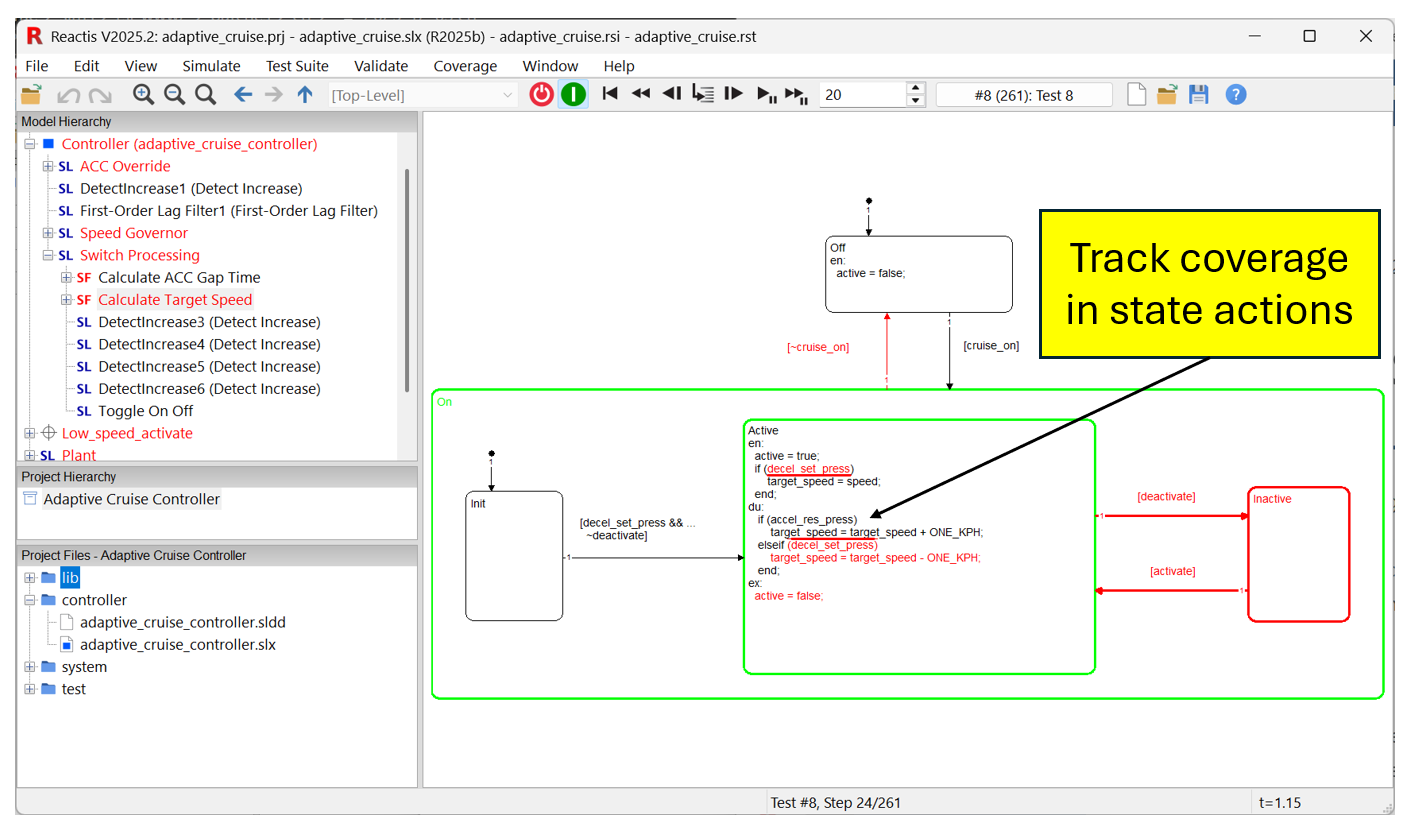
For Stateflow charts using the MATLAB action language, Reactis now supports
tracking coverage in state entry, during, and exit actions. The tracked coverage
metrics are statement, decision, condition, MC/DC, and MCC coverage. As shown
in the image below, Reactis Simulator conveys coverage information within the
code of a state using red highlighting as well as underlining and overlining.
Reactis Tester also identifies and attempts to exercise these coverage targets
with the tests it generates. Note that tracking this coverage requires the
Reactis for EML Plugin.
Model Comments
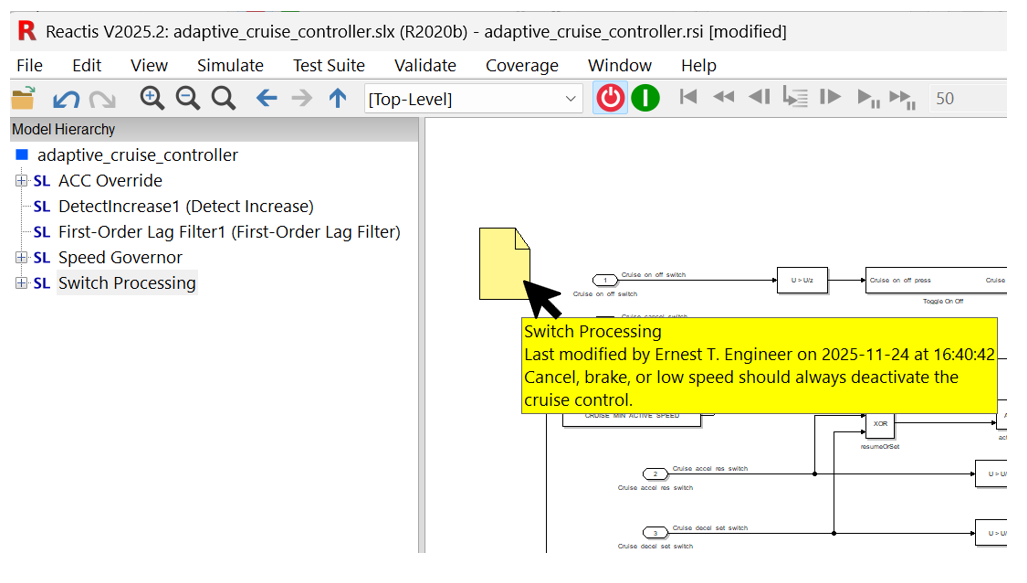
You can now add a comment at any location within a model with a right-click.
Comments are saved in the Reactis info file (.rsi) maintained by
Reactis, leaving the model file itself unmodified. For each comment, Reactis
tracks the date the comment was created, the person who created it, the date of
last modification, and the person who made the modification. A list of all
comments in a model can be displayed by selecting Edit > Comments.
Newly Supported Simulink Features
The following Simulink features are newly supported in Reactis V2025.2:
- MATLAB R2025b.
- MATLAB projects, see description above.
- Using Simulink.VariantVariable objects in block parameters.
- Top-level input ports can have Output function call setting checked.
Test Suite CSV Template Creation
A new menu entry Test Suite > Create CSV Template lets you create a CSV template to help import test data into Reactis. For the currently loaded model, it creates a CSV (comma separated values) file containing a single row that includes the name of each top-level input and output of the model as well as test points and configuration variables. You can load this template in Excel, fill in the desired test data, and import the hand-crafted test into Reactis.
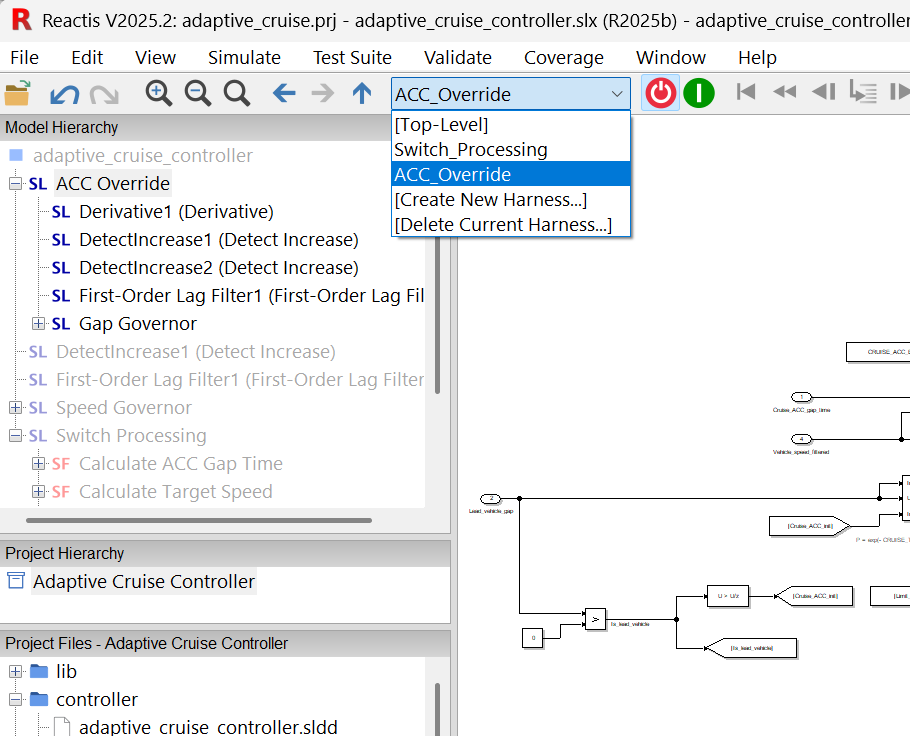
Harness Selector in Main Window
The harness selector drop-down box, previously only accessible within the RSI File Editor, is now also accessible in the main Reactis toolbar, simplifying switching harnesses in Reactis.
Omit Empty Metrics in Coverage Report
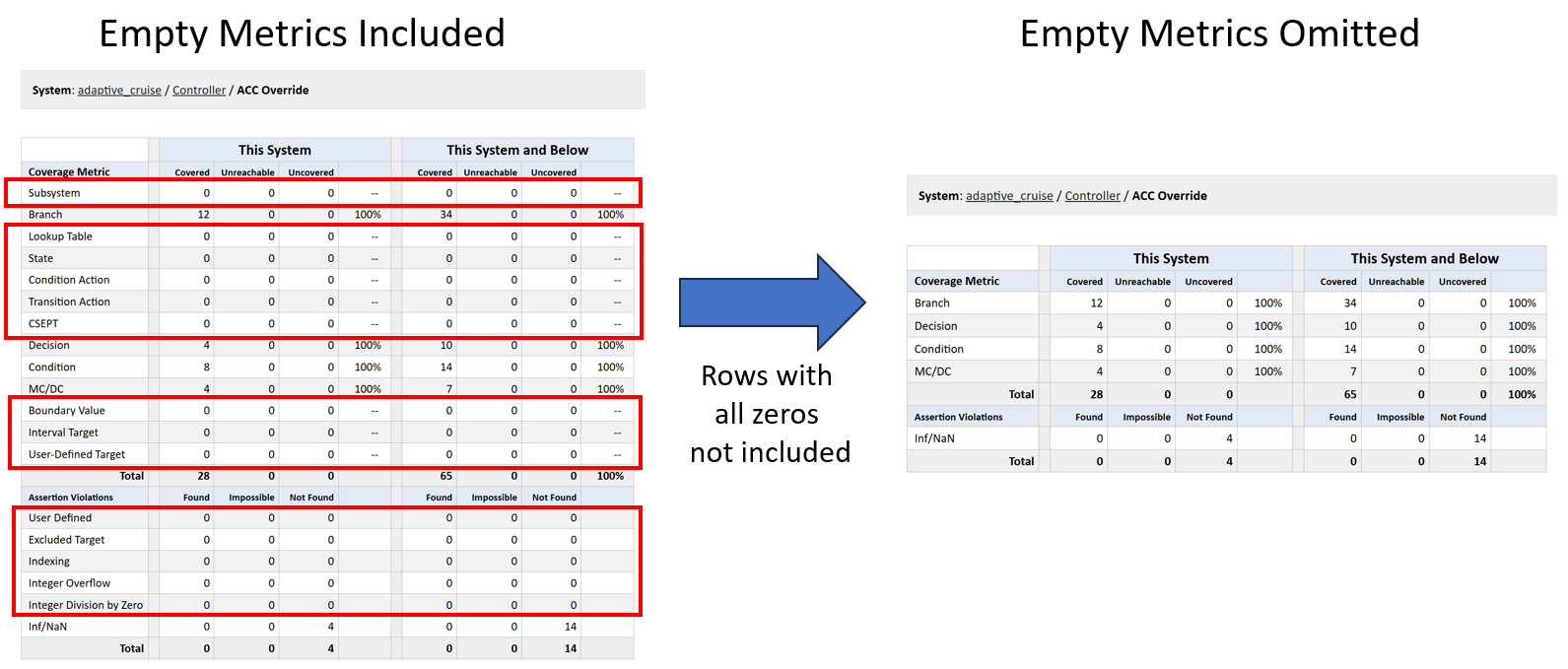
A new option when generating a coverage or test execution report lets you omit summary rows for coverage metrics for which no targets are present in a Simulink system or Stateflow chart. This leads to more compact and readable reports.
GUI Supports Detached Panels
The Reactis GUI now lets you detach or rearrange the following panels:
Model Hierarchy, Project Hierarchy, Project Files, and
Watch Variables. You move or detach a panel by clicking on its title bar
and dragging.
Reactis Model Inspector V2025.2
Reactis Model Inspector V2025.2 adds support for R2025b, MATLAB projects, and
the new comments feature described above for Reactis. Unlike other items stored
in the Reactis info file (.rsi), you can add and edit comments in
Reactis Model Inspector in addition to viewing comments added using Reactis for
Simulink.
Reactis for C V2025
Simplified Testing of AUTOSAR Code
A new import wizard enables a standalone AUTOSAR component to be tested in Reactis for C. For an AUTOSAR component derived from a Simulink model, this simplifies back-to-back testing of code against the model.
Given a set of ARXML files describing an AUTOSAR component, the import wizard generates a minimal RTE, build file, and harness necessary to test a runnable of the component in Reactis for C. After the import into Reactis for C, you can automatically generate tests, find runtime errors, and track coverage.
The import wizard can make the C harness match a model harness defined in Reactis for Simulink. This allows you to directly run tests generated from a model by Reactis for Simulink on code in Reactis for C (and vice-versa).
Harness Selector in Main Window
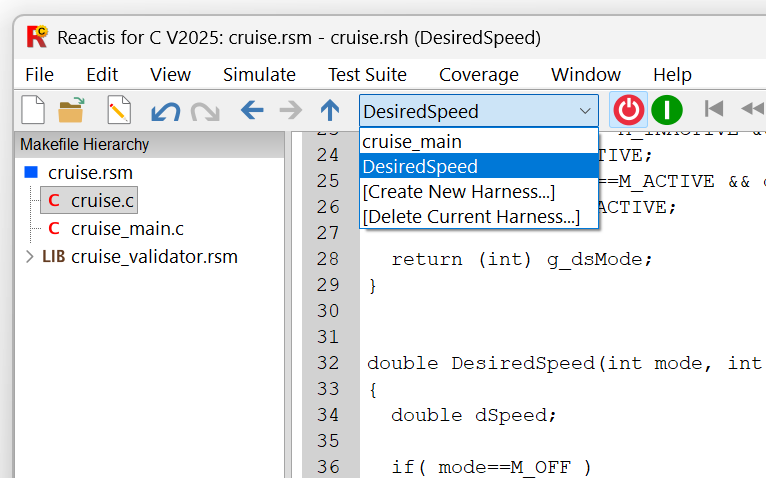
The harness selector drop-down box, previously only accessible within the Reactis Harness Editor, is now also accessible in the main Reactis for C toolbar, simplifying switching harnesses in Reactis for C.
Test Suite CSV Templates
Reactis for C can generate a CSV (comma-separated value) template to facilitate the manual creation of test data. You can generate a template for a given harness of a program, load the template into Excel, fill in the test data, then import the CSV file into Reactis for C as a test to be run.
Omit Empty Metrics in Coverage Report
A new option when generating a coverage or test execution report lets you
omit rows for coverage metrics for which no targets are present in a C file.
This leads to more compact and readable reports.
Compatibility & Upgrade Notes
- Reactis V2025.2 supports MATLAB R2015b-R2025b.
- Plugins: Tracking coverage in Stateflow state action code requires the Reactis for EML Plugin..
Availability
- Download Reactis V2025.2 from Reactis User Pages
- Contact support at help@reactive-systems.com for upgrade assistance.
Legal
Reactis is a registered trademark of Reactive Systems, Inc. MATLAB,
Simulink, Stateflow, and Embedded MATLAB are registered trademarks of MathWorks,
Inc. AUTOSAR is a registered trademark of the AUTOSAR GbR.
Best regards,
The Reactis Team