What's New in Reactis® V2026
- Simulink® Variant testing with automatic configuration coverage
- AUTOSAR® whole-component testing with scheduler generation
- Trace signals into and out of Stateflow®
- Better reachability analysis and test generation
- Coverage control pragmas for C code
- MATLAB R2026a support
Reactis for Simulink
Simulink Variants
Automatically test multiple Simulink variant configurations in a single Tester run, improving cumulative coverage while reducing manual setup.
In Simulink, Variant Subsystems give you a mechanism for specifying alternative implementations for part of your model and to easily switch between these alternatives. Only one variant is active at a time.
Reactis V2026 introduces a feature to let you switch the variant using the Reactis configuration variable mechanism. This enables different tests within a Reactis test suite to have different configuration variable settings and thereby trigger different active variants. This in turn lets Reactis Tester use different variants for the different tests it generates and to cumulatively track coverage of the different subsystem variants within a single Tester run.
Furthermore, a new API function
rsRsiCreateVariantConfigurationSets automatically imports variant
configuration information from Simulink into Reactis. This enables Reactis
Tester to cover all variant configurations defined for a model in Simulink. The
import automatically creates configuration variables and configuration variable
sets in Reactis that correspond to the Simulink variant configurations and their
control variables.
Coverage Enhancements
Have confidence that all variants are tested.
In Reactis, a configuration variable is a variable from the base workspace, the model workspace, or a data dictionary that Reactis can change in between tests but not during a test. Each configuration variable can have a constraint which limits it to a specified range or set of specific values. Sometimes one configuration variable might depend on another. Such dependencies can be captured with a configuration variable set which assigns a constraint to each configuration variable of a model.
V2026 tracks coverage for configuration variable sets. Each set is shown in the Configuration Variables panel and colored according to whether it has been covered or not. A configuration variable set is considered covered when at least one simulation step has been taken where the value of each configuration variable matches its constraint from the configuration variable set.
Apart from improving the visibility of whether a set has actually been used during simulation, the new tracking also enables Reactis Tester to automatically create tests that cover each defined configuration variable set.

Stateflow Tracing
Understand how data flows into and out of Stateflow.
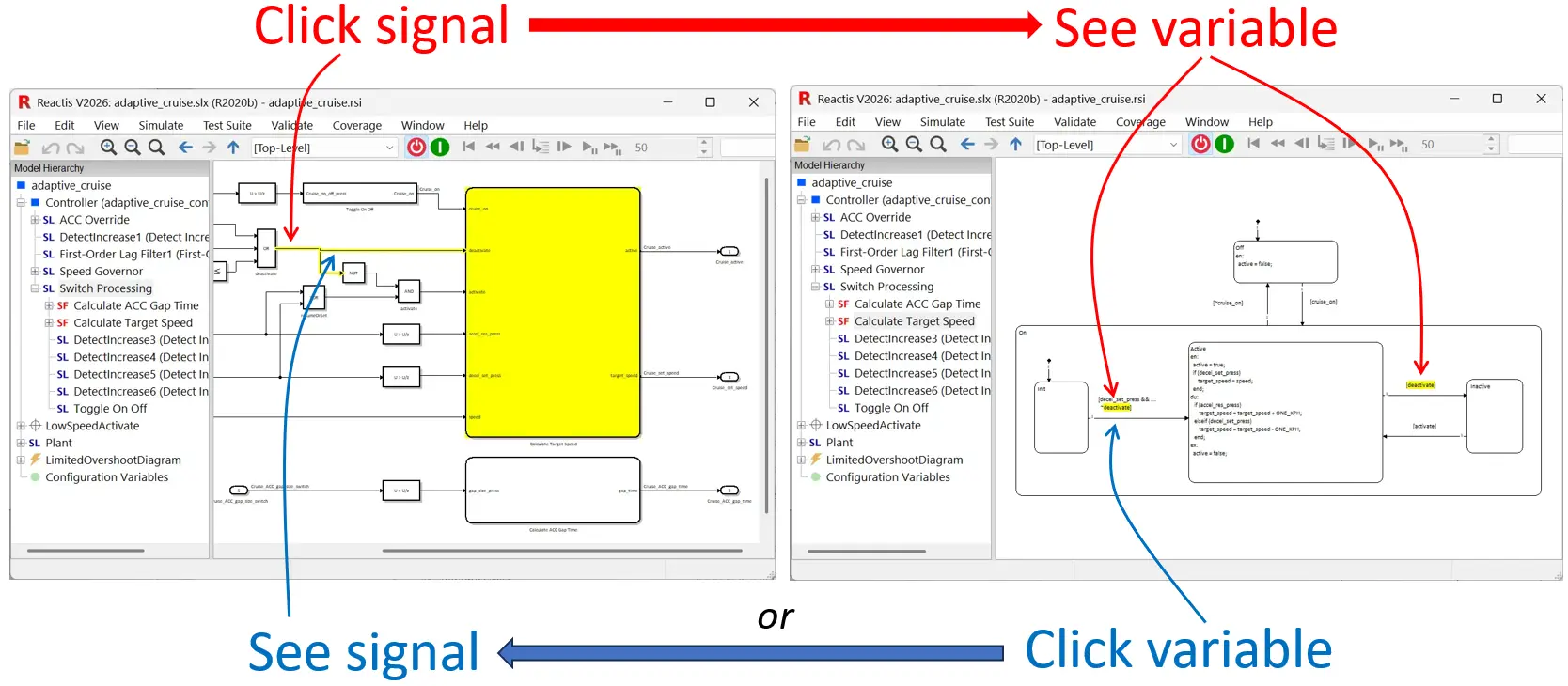
V2026 extends the existing signal-tracing mechanism in Reactis to trace into and out of Stateflow diagrams. If a signal entering or exiting a Stateflow chart is highlighted (by clicking on it in the main Reactis panel), then Reactis highlights all occurrences of the corresponding Stateflow variable in the Stateflow chart. If a variable is clicked within a Stateflow chart, Reactis highlights all other occurrences of that variable within the chart and, if the highlighted variable is a chart input or output, the corresponding signal in Simulink is also highlighted.
Static Analysis Improvements
Unreachable targets can alert you to modeling errors.
This Reactis release offers improvements to static model reachability analysis and solver capabilities during test case generation. The goal of these enhancements is to identify more targets as unreachable (and more assertions as impossible to violate) during static analysis and to enable Tester to cover more targets during test generation. The changes include the following:
- New model-specific settings (Edit > General) to configure how much
time Reactis should spend on reachability analysis when starting Simulator
and Tester. This lets you allocate more time for large models.

- Improved reachability analysis and test case generation for the following
coverage targets:
- Condition targets appearing after short-circuit operators
- Relational operator boundary coverage targets
- Improved reachability analysis and test case generation for the following
Simulink and Stateflow features:
- Enumerated types
- Simulink mask parameters
- Improved reachability analysis:
- Mark most types of target as unreachable if they occur within unreachable conditional subsystem.
- Consider limited output ranges of certain functions (e.g. Sqrt/Sin/Cos) when determining reachability of downstream targets.
Newly Supported Simulink Features
The following Simulink features are newly supported in Reactis V2026:
- MATLAB R2026a.
rising,fallingandcrossingfunctions in Stateflow charts that use the C action language.- State output port for Discrete Integrator block.
- Additional Discrete PID Controller block configurations are now supported.
- Nearest interpolation mode for Nd-Lookup Table blocks.
- Reactis now offers an option to ignore blocks from the Simulink Test library.
Other Improvements
Export RSI file items to CSV file
A new menu entry Tools > Export to CSV File in the RSI File Editor lets you create a CSV file containing a list of the current model's inports, outports, configuration variables and test points including the data types and constraints for each item.
Improved display of fixed-point values in GUI
For data items of fixed-point type shown in the Watched Variable Panel and Test Suite Browser, you can now specify the number of digits shown after the decimal point. Specifying -1 will show exactly as many digits as necessary to accurately represent the fixed-point value given its slope.
Menu item to open model folder
A new menu entry File > Open Model Folder lets you open a Windows Explorer window for the folder in which the current model is located. This reduces the steps necessary to open files created by Reactis in other tools.
Reactis for C
V2026 focuses on improved testing flexibility and AUTOSAR whole-component testing. Key additions include pragma-based coverage control and whole-component AUTOSAR testing. The new release of Reactis for C includes all bug fixes that were included in patch release V2025.0.1, plus the following new features.
Coverage Pragmas
Focus your testing by ignoring unimportant targets.
Reactis for C tracks how thoroughly tests exercise your code using a collection of coverage metrics, including statement coverage, decision coverage, condition coverage, MC/DC coverage and others. For each metric, a set of coverage targets is identified within your code. Reactis Simulator then tracks whether each target has been exercised and Reactis Tester attempts to generate tests that maximize the number of targets exercised.
While you typically want to test your entire program, sometimes you may wish
to focus on one part of your code and not on others. To facilitate such focused
testing, V2026 introduces a new C pragma to disable target generation for a
section of code. #pragma REACTIS coverage off stops target creation
for all lines which follow, until a line containing #pragma REACTIS
coverage on is reached. There is no need to modify your source files,
since these pragmas can be added as instrumentation code. This lets you
precisely target the important sections of your code, while ignoring irrelevant
parts. The new pragmas are especially useful for testing code that accesses
legacy code, external libraries, or third-party code not under your control.
AUTOSAR Whole-Component Testing
Easy back-to-back testing of C code against model for whole AUTOSAR component.
V2025 introduced an AUTOSAR import wizard that, given a set of ARXML files describing an AUTOSAR component, generates a minimal RTE, build file, and harness necessary to test a single runnable of the component in Reactis for C.
V2026 extends the import tool to facilitate testing a whole component, i.e. all runnables of the component together. When importing a component with multiple runnables, Reactis for C automatically generates a scheduler that triggers each runnable as specified in the AUTOSAR component.
Previously, only single runnables could be tested in isolation. The new version of Reactis enables integrated testing of all runnables with automatic scheduler generation.
Management of Reactis-Generated Files
V2026 offers a new global option in the C Code tab of File > Global Settings... that lets you configure Reactis for C to store Reactis-generated files in a separate folder. You can place all files in a subfolder of the folder containing the build (.rsm) file, or select a single folder to contain all compiler-generated files. This makes it easy to keep track of Reactis-generated files, and delete them when they are no longer needed.
Other Improvements
Data dictionary variable names are now automatically matched during harness import.When importing a Reactis for C test harness from a .rsi file,
names which originate from a Simulink data dictionary (.sldd) file are now
automatically matched to variables in the C code with the same name.
This eliminates the need to manually match data dictionary variables.
Open the build file folder in Windows Explorer from the File menu.
A new menu choice File > Open Build File Folder opens the folder containing the currently open build file in Windows Explorer. This is useful when you need to access files outside of Reactis.
Legal. Reactis is a registered trademark of Reactive Systems, Inc. MATLAB, Simulink, and Stateflow are registered trademarks of MathWorks, Inc. AUTOSAR is a registered trademark of the AUTOSAR GbR.
Best regards,
The Reactis Team