Back-to-Back Testing with Reactis
Verify that your C code implementation matches the behavior of your Simulink model. Generate tests from the model, run them on the C code, and automatically detect behavioral differences for ISO 26262 compliance and quality assurance.
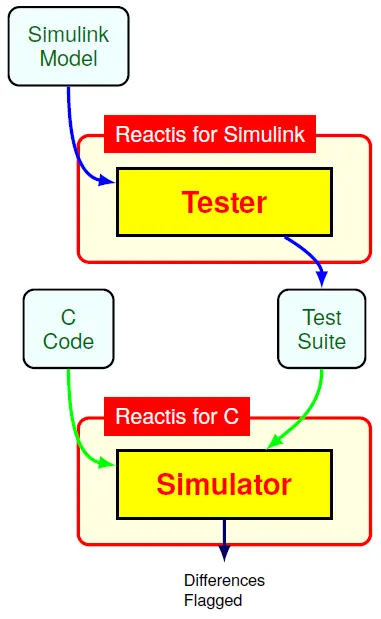
What is Back-to-Back Testing?
Back-to-back testing compares the outputs of a model (e.g., Simulink) and its implementation (e.g., C code) when given the same inputs. The goal is to ensure the implementation faithfully represents the model, detecting discrepancies that could indicate bugs or misinterpretations during code generation or manual coding.
In ISO 26262 processes, back-to-back testing is recommended (sub-clauses 9.4.2 and 10.4.2) to validate that the software unit matches the design model. Reactis automates this process by generating comprehensive test suites from the model and executing them on the C code.
How Reactis Supports Back-to-Back Testing
Together, Reactis for Simulink and Reactis for C provide seamless back-to-back testing:
- Generate tests from the model: Use Reactis Tester to create test suites that exercise the Simulink model comprehensively, targeting coverage metrics like MC/DC.
- Execute on C code: Run the same tests on your C implementation using Reactis for C.
- Automatic comparison: Reactis detects and flags any behavioral differences (output mismatches) or runtime errors in the C code.
- Replay and debug: When differences are found, replay the execution of the model and code in lock step to inspect variable values and trace the root cause.
- Evidence generation: Produce reports documenting the tests, coverage, and any discrepancies for safety case artifacts.
Workflow
1. Prepare Model & Code
Load your Simulink model and C source files. Ensure inputs and outputs are aligned.
2. Generate Tests
Use Reactis Tester to create a test suite from the model, achieving high coverage.
3. Run on C Code
Execute the tests on the C implementation and compare outputs automatically.
4. Analyze Results
Review flagged differences, replay executions, and generate compliance reports.
Benefits
Automated Verification
Reduce manual effort by automating test generation and comparison, ensuring consistent and repeatable validation.
Early Bug Detection
Catch implementation errors (e.g., rounding differences, logic flaws) before integration or deployment.
ISO 26262 Compliance
Generate evidence of verification activities, supporting ASIL work products and safety case arguments.
Confidence in Code Generation
Validate auto-generated code from tools like Embedded Coder or TargetLink against the original model.
Traceable Artifacts
Produce CSV test templates, HTML reports, and execution logs for audits and process documentation.
Scalable to Complex Systems
Handle large models and C codebases with guided simulation and targeted test generation.
Requirements & Compatibility
Back-to-back testing requires both Reactis for Simulink and Reactis for C (or the C Plugin). The C code can be hand-written or auto-generated. Reactis supports GCC, Clang, MSVC, and ARM toolchains.
For AUTOSAR components, Reactis can import ARXML to auto-generate the RTE and harness, simplifying the setup.
Ensure your C code matches your model. Request a demo or download a trial to see back-to-back testing in action.
Schedule Demo → Download Trial →
Learn more: Reactis for Simulink | Reactis for C | ISO 26262 Support