
7. Revision History#
Different versions of Reactis Model Inspector are labeled as shown in Figure 7.1 and described below.
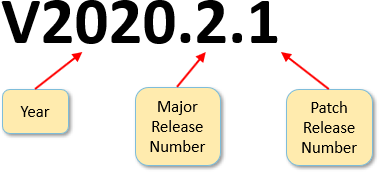
Fig. 7.1 Version labels begin with a “V” and include three parts: a year, a major release number, and a patch release number. The parts are numbers separated by decimal points. By convention, trailing zeros are omitted.#
- Major Releases.
There are two major Reactis Model Inspector releases each year, for example V2025 and V2025.2.
- Beta Releases.
Reactive Systems sometimes makes beta releases available to customers interested in evaluating the newest features of Reactis Model Inspector. Beta releases do not undergo as much testing as major releases do. By convention, beta releases have odd numbered major release numbers. For example, V2025.1, and V2025.3 denote beta releases.
- Patch Releases.
Both stable and beta releases may be patched. The label for a patch release is constructed by extending the label for the major release to be patched with a suffix that includes a second decimal point and a patch release number. For example:
- V2025.0.1
denotes the first patch release for V2025
- V2025.2.3
denotes the third patch release for V2025.2
7.1. Patches Mailing List Archive#
Patches to Reactis Model Inspector are posted to the Reactive Systems website between major releases. To view a summary of recent changes, please view the archives of the Reactis Model Inspector Patches mailing list available at:
7.2. V2025.2 (3 December 2025)#
The V2025.2 release of Reactis Model Inspector adds the following new features:
7.2.1. Support MATLAB/Simulink Projects#
Reactis now supports loading MATLAB projects (formerly Simulink projects). This simplifies the process of setting up a model for use in Reactis. The purpose of MATLAB projects is to define settings like model search path and workspace initialization. Reactis now reads those definitions from the MATLAB project, eliminating the need to repeat these setup steps within Reactis.
7.2.2. Model Comments#
Users can now add comments to models within Reactis. Comments are saved in the
.rsi file maintained by Reactis, leaving the model file itself unmodified. For
each comment, Reactis tracks creation date and user as well as the user and date
when it was last modified.
A comment is pinned to a specific location within a model, i.e. a location in a Simulink system or Stateflow chart of the model. Additionally, a list of all comments in a model can be displayed by selecting Edit > Comments.
7.2.3. Harness selector in main window.#
The harness selector drop-down box, previously only accessible within the RSI File Editor, is now also accessible in the main Reactis toolbar, simplifying switching harnesses in Reactis.
7.2.4. Newly Supported Simulink Features#
The following Simulink features are newly supported in Reactis V2025.2:
MATLAB R2025b.
MATLAB projects, see description above.
7.3. Previous Major Release Dates#
Major releases of Reactis Model Inspector prior to V2024 have occurred on the following dates:
Version |
Release Date |
|---|---|
V2025 |
June 3, 2025 |
V2024.2 |
November 21, 2024 |
V2023.2 |
December 22, 2023 |
V2023 |
Jume 30, 2023 |
V2022.2 |
December 23, 2022 |
V2022 |
June 22, 2022 |
V2021.2 |
December 23, 2021 |
V2021 |
July 9, 2021 |
V2020.2 |
December 18, 2020 |
V2020 |
July 17, 2020 |
V2019.2 |
December 20, 2019 |
V2019 |
June 28, 2019 |
V2018.2 |
December 20, 2018 |
V2018 |
June 27, 2018 |
V2017.2 |
December 22, 2017 |
V2017 |
July 7. 2017 |
V2016.2 |
December 22, 2016 |
V2016 |
June 20, 2016 |
V2015.2 |
December 18, 2015 |
V2015 |
June 30, 2015 |
V2014.2 |
December 19, 2014 |
V2014 |
June 25, 2014 |
V2013.2 |
December 17, 2013 |
V2013 |
August 9, 2013 |
V2012 |
November 26, 2012 |